A Professional's Take on the New Surface Ergonomic Keyboard
Introduction: The Evolution of Ergonomic Precision
In the contemporary digital workplace, the keyboard is more than just a peripheral; it is the primary interface between human intent and digital execution. For professionals—ranging from software engineers and data analysts to technical writers and administrative executives—the desktop setup is a cockpit that dictates not only productivity but also long-term physical health. The introduction of the Surface Ergonomic Keyboard marks a significant milestone in the evolution of input devices, blending the sophisticated aesthetics of the Surface lineup with the rigorous anatomical demands of ergonomic science. While Microsoft has long been a pioneer in split-keyboard designs, dating back to the legendary Natural Keyboard series of the 1990s, this newest iteration attempts to bridge the gap between "utilitarian health tool" and "premium professional instrument."
The Surface Ergonomic Keyboard is designed for an era where the boundary between home and office has blurred, and where the duration of time spent at a desk has reached unprecedented levels. Modern professionals are increasingly aware of Repetitive Strain Injury (RSI), Carpal Tunnel Syndrome, and general muscular fatigue. Consequently, the selection of a keyboard is no longer a trivial IT procurement decision; it is a choice focused on career longevity and daily comfort. This article provides a comprehensive, professional analysis of the hardware, examining how its design philosophy translates into real-world efficiency and whether its premium positioning holds up under the scrutiny of heavy daily utilization.
Design Philosophy: Arches, Slopes, and Aesthetics
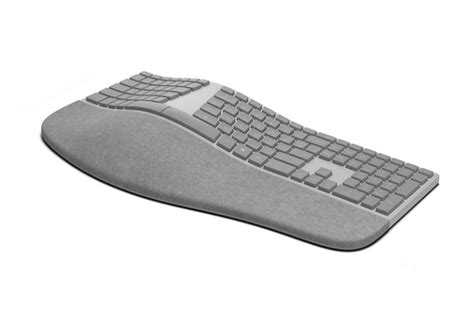
At first glance, the Surface Ergonomic Keyboard is a striking departure from the boxy, black plastic frames that dominate the ergonomic market. Built around the concept of "natural typing," the device features a double-arched shape. This geometry is not merely for visual flair; it is engineered to facilitate a neutral wrist position. By splitting the keys into two distinct banks and sloping the entire chassis downward from the center, the keyboard forces the hands to sit at a natural angle. This prevents "wrist pronation"—the act of turning the forearms so palms are flat against the desk—which is the primary cause of strain in traditional keyboard use.
The material choice is where Microsoft distinguishes itself from competitors. The palm rest is covered in a specialized gray Alcantara fabric. For those unfamiliar with the material, Alcantara is a high-end synthetic textile often found in luxury automotive interiors and high-fashion accessories. It offers a unique sensory experience: it is soft to the touch, provides a degree of warmth that plastic lacks, and offers a subtle grip that keeps the palms from sliding during intensive typing sessions. Underneath the fabric is a double-layer cushion that provides just enough "give" to be comfortable without being so soft that it feels unstable. This focus on tactile luxury suggests that Microsoft views the ergonomic user not as someone with a medical ailment, but as a professional who appreciates craftsmanship.
Key Feel and Actuation
While the shape of an ergonomic keyboard is vital, the typing experience is defined by the keys themselves. The Surface Ergonomic Keyboard utilizes a chiclet-style key mechanism, similar to those found on the high-end Surface Pro Type Covers or the Surface Laptop. This setup results in a shorter travel distance compared to mechanical keyboards or older membrane designs. For the professional typist, this often translates to a faster, more "snappy" response. The keys have a refined resistance profile; there is a clear tactile bump upon actuation, followed by a quiet, dampened return. This makes the keyboard exceptionally well-suited for open-office environments or late-night work at home, where loud clicking might be disruptive.
The key spacing is generous, particularly the oversized Space Bar, which is split into two halves—one for each thumb. This reinforces the ergonomic intent, ensuring that the thumbs remain in a relaxed position. One subtle yet crucial detail is the slight curvature of the keycaps themselves. Each key is slightly concave, guiding the fingertips toward the center of the key and reducing the likelihood of "fat-fingering" adjacent characters. For a professional coder or editor, these small refinements contribute to a higher degree of accuracy over several thousand words or lines of code.
Professional Use Cases and Real-World Impact
To understand the value of this device, one must look at how it performs in specific professional scenarios. Consider the "Power User" who manages complex spreadsheets or large-scale project management software. The Surface Ergonomic Keyboard includes a full numeric keypad on the right side. Unlike some ergonomic designs that separate the Numpad to save desk space, Microsoft has integrated it into the chassis. While this increases the footprint of the device, it provides the structural stability that number-heavy professionals require. There is no flex when punching in digits, and the layout remains standard, preventing the learning curve that often accompanies "tenkeyless" or custom ergonomic layouts.
Shop the latest Electronics picks on Amazon.
View Offers →For the creative professional—such as a video editor or graphic designer—the keyboard serves as a stable anchor for keyboard shortcuts. The integrated media keys and the dedicated calculator, search, and task-view buttons provide quick access to system-level functions. The wireless nature of the device, powered by Bluetooth 4.0/4.1/5.0, ensures a clean, minimalist desk aesthetic. This is particularly important for professionals who value "deep work" environments where visual clutter is a distraction. The connection is remarkably stable, with low latency that is imperceptible during standard typing tasks.
The Ergonomic Transition Period
It is important for buyers to recognize that moving from a flat keyboard to a split, arched keyboard involves a transition period. For the search-and-peck typist, the Surface Ergonomic Keyboard will be a challenge, as it requires a traditional "home row" typing technique. However, for the trained typist, the transition is surprisingly intuitive. Because the angle of the split is moderate rather than extreme, the muscle memory adjustment usually takes between two to five days. Once the adjustment is made, many professionals find it difficult to return to flat keyboards, as the "relief" in the forearms and shoulders becomes noticeable almost immediately.
Pros and Cons: A Balanced Assessment
Every piece of hardware involves trade-offs. The Surface Ergonomic Keyboard prioritizes aesthetics and wrist health, but it may not be the perfect fit for every user depending on their specific needs and environment.
- Pro: Natural Wrist Alignment – The 12-degree split and the arched "hump" effectively reduce the strain on the ulnar nerve and eliminate wrist extension.
- Pro: Premium Alcantara Palm Rest – The hand-finished fabric feels superior to plastic or rubberized rests, providing a luxury feel that holds up during long shifts.
- Pro: Exceptional Battery Life – Operating on two AAA batteries, the keyboard can last up to 12 months under normal professional use, removing the anxiety of frequent charging.
- Pro: Dedicated Numeric Keypad – Essential for finance, accounting, and data entry professionals who cannot compromise on productivity.
- Pro: Quiet Operation – The dampened chiclet keys make it one of the quietest professional keyboards on the market.
- Con: Fixed Layout – Unlike "tented" keyboards like the Kinesis Freestyle, the Surface Ergonomic has a fixed angle that cannot be adjusted to different heights or widths.
- Con: Large Footprint – Due to the integrated Numpad and wide palm rest, it requires a significant amount of desk real estate and may not fit in compact keyboard trays.
- Con: Bluetooth Only – There is no option for a wired USB connection, which might be a dealbreaker for users in high-security environments where Bluetooth is restricted.
- Con: Maintenance of Fabric – While durable, the Alcantara palm rest requires occasional cleaning with a damp cloth to prevent the buildup of oils or dust over years of use.
Comparative Analysis: How It Stands Against the Field
For a professional buyer, context is key. Choosing a keyboard involves comparing it against the market standards. Below is a comparison table showcasing how the Surface Ergonomic Keyboard stacks up against other common types of keyboards found in professional environments.
| Feature | Surface Ergonomic | Standard Desktop Keyboard | Mechanical Gaming Keyboard | Compact/Laptop Style |
|---|---|---|---|---|
| Primary Focus | Ergonomics & Comfort | Cost & Familiarity | Speed & Tactile Feedback | Portability |
| Wrist Strain | Minimal (Arched/Split) | High (Flat) | Moderate (Depending on height) | High (Cramped) |
| Key Travel | 1.5 mm (Chiclet) | 2.5 - 3.5 mm (Membrane) | 4.0 mm (Mechanical) | 1.0 - 1.2 mm (Scissor) |
| Connectivity | Wireless (Bluetooth) | Wired (USB) | Wired or 2.4GHz Wireless | Bluetooth / Wired |
| Operating Noise | Very Low | Moderate | Very High (Clicky variants) | Low |
| Numeric Pad | Integrated | Integrated | Optional | Usually Absent |
Buying Guide: Is the Surface Ergonomic Right for You?
Investing in a high-end keyboard is a commitment to your daily workflow. Before making a purchase, professionals should evaluate three primary factors: their typing style, their physical workspace, and their technical requirements.
1. Evaluate Your Typing Technique
If you are a "touch typist" who uses all ten fingers and keeps your hands on the home row, the Surface Ergonomic Keyboard will likely feel like a massive upgrade. The split design rewards proper technique. However, if you are a "hunt-and-peck" typist where your hands frequently cross the midline of the keyboard, you may find the physical gap between the "T" and "Y" or "G" and "H" keys frustrating. For these users, a traditional "curved" (but not split) keyboard might be a gentler transition.
Find top-rated Electronics products at great prices.
See Deals →2. Analyze Your Desk Space
The Surface Ergonomic Keyboard is a wide device. It measures approximately 18 inches in length. If you use a large mousepad for precision design work or if you operate within a narrow keyboard tray, you must ensure you have enough clearance. Additionally, because the keyboard is arched, it sits higher than a standard flat keyboard. You should check that your chair armrests or desk height allow your elbows to remain at a 90-degree angle without your wrists being forced to "reach up" to the keys.
3. Technical Compatibility
The keyboard is optimized for Windows 10 and Windows 11. While it can function as a standard HID Bluetooth keyboard with macOS, iOS, or Android, some of the specific "Specialty Keys" (like the Task View or Snipping Tool shortcuts) may not map correctly without third-party software. Furthermore, ensure your computer has Bluetooth built-in or that you have a compatible Bluetooth dongle, as Microsoft does not include a proprietary USB receiver in the box.
4. The "Longevity" Consideration
Professionals should view this keyboard as a 3-to-5-year investment. The build quality is robust, but the Alcantara fabric is the one variable that requires care. If you tend to eat at your desk or work in dusty environments, you may want to consider a keyboard with an all-plastic finish. However, for a clean office or a dedicated home studio, the comfort of the fabric is often worth the minimal maintenance required.
Conclusion: The Professional Vertical
The Surface Ergonomic Keyboard represents a successful marriage of form and function. It addresses the growing need for ergonomic health without sacrificing the "premium" feel that modern professionals expect from their gear. The device creates a typing experience that is both physically restorative and functionally efficient. By moving away from the industrial, "medical-grade" look of traditional ergonomic keyboards and toward a sleek, sophisticated design, Microsoft has made a compelling case for health-conscious hardware in the executive suite.
Ultimately, a keyboard's value is found in the absence of pain and the presence of focus. When your wrists are aligned, your shoulders are back, and the keys respond with a quiet, reliable click, the hardware fades into the background, allowing the work to take center stage. For the professional who spends eight or more hours a day at their computer, the Surface Ergonomic Keyboard is not just a tool—it is an essential component of a sustainable, high-performance career. While it requires a bit of desk space and a few days of adaptation, the long-term benefits to comfort and productivity make it a standout choice in the crowded landscape of professional electronics.